

Lights, Camera, Savings! Essential Filmmaking Gear for Beginners
Written by: The Buddi Team
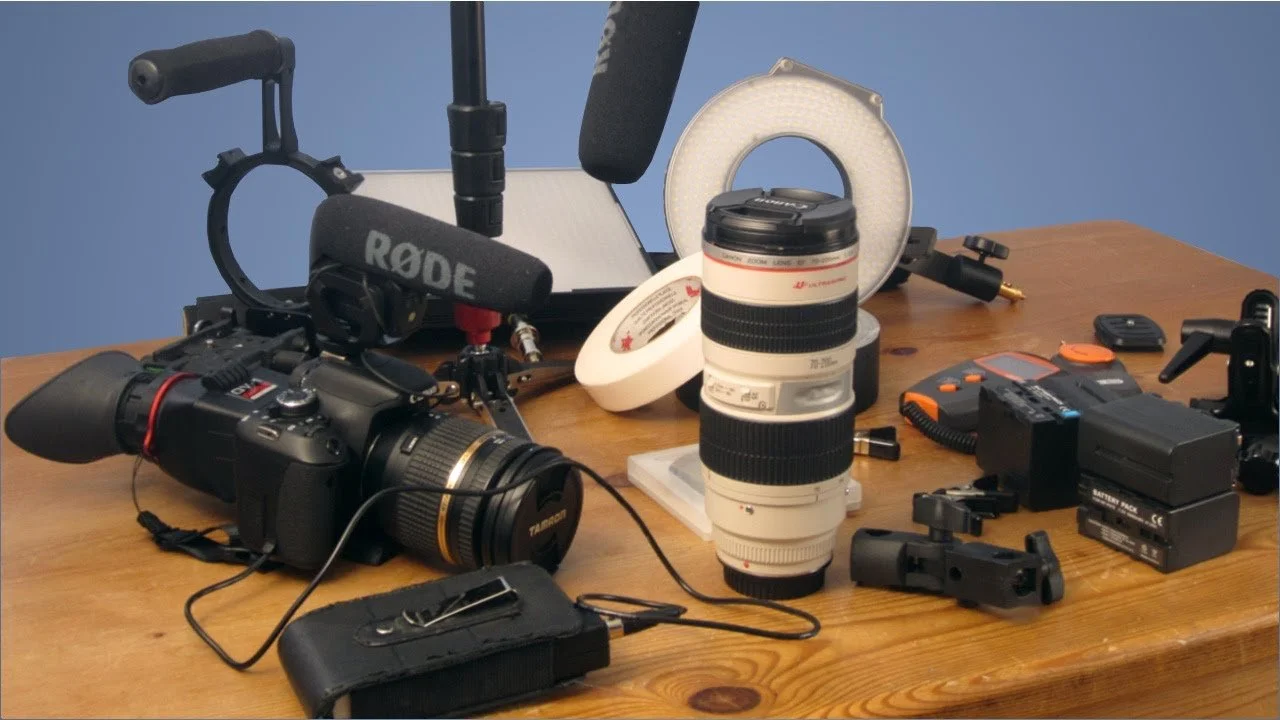
So, you're bitten by the filmmaking bug and ready to bring your stories to life? That's fantastic! But staring at a list of professional equipment can be overwhelming, especially when you're just starting and working with a limited budget. Fear not, aspiring filmmakers! You can absolutely get started and create compelling content without breaking the bank.
This guide will walk you through the essential gear you need to kickstart your filmmaking journey, all while keeping your total investment under $1000. We'll focus on versatile, beginner-friendly options that will give you the most bang for your buck.
1. The Heart of Your Operation: A Capable Camera (Your Smartphone!) - Cost: Already Owned
Yes, you read that right! In today's world, the most accessible and often surprisingly capable filmmaking tool is likely already in your pocket: your smartphone. Modern smartphones boast incredible camera technology, capable of capturing stunning HD or even 4K video.
Why it's essential: It's readily available, easy to use, and can produce excellent results, especially with good lighting and composition.
Tips for better smartphone filmmaking:
Clean your lens! You'd be surprised how much difference this makes.
Shoot in landscape orientation. Unless you're specifically creating content for vertical platforms like TikTok or Instagram Reels, landscape is the standard for storytelling.
Explore your phone's camera settings. Many phones allow you to adjust resolution, frame rate, and even manual focus and exposure.
2. Stability is Key: A Tripod with a Fluid Head - Budget: $50 - $125
Shaky footage is a hallmark of amateur video. A good tripod will instantly elevate the professionalism of your work.
Why it's essential: Provides stable shots, allowing for smooth pans and tilts (if it has a fluid head), and enables time-lapses and locked-off compositions.
What to look for: Sturdy build, lightweight for portability, a fluid head for smoother movements, and adjustable height. Look for reputable brands like Manfrotto (entry-level), Benro, or even well-reviewed generic brands available on Amazon or in electronics stores.
3. Hear Ye, Hear Ye: An External Microphone - Budget: $25 - $100
Audio is often more crucial than video quality. Poor audio can make even the most visually stunning footage unwatchable.
Why it's essential: Significantly improves the clarity and quality of your audio compared to your camera's built-in microphone.
Types to consider:
Lavalier (Lapel) Microphone: Great for interviews and dialogue, clipping directly onto your subject's clothing. Look for wired options to stay within budget.
Shotgun Microphone: Picks up sound from a more focused direction, ideal for isolating a subject's voice in noisy environments. You might need a separate cold shoe mount for your camera or phone rig.
Brands to look for: Rode (VideoMicro is popular), Boya, Comica (entry-level options). Check out online retailers like B&H Photo Video, Amazon, or local electronics stores.
4. Shedding Some Light: Basic Lighting Kit or Reflectors - Budget: $50 - $150
Good lighting can dramatically improve the look and feel of your video. You don't need expensive studio setups to start.
Why it's essential: Allows you to control the brightness, mood, and overall visual appeal of your shots.
Budget-friendly options:
Small LED Panel Light: Compact, portable LED lights are versatile for interviews or adding fill light. Look for models that are USB-powered or use AA batteries.
Reflectors: Inexpensive and versatile tools that bounce existing light (sunlight or artificial light) onto your subject, filling in shadows. A 5-in-1 reflector is a fantastic investment.
Even a bright desk lamp with diffusion (like a bedsheet) can be a starting point!
5. The Glue That Holds It Together: Basic Editing Software - Budget: Free - $125 (for a one-time purchase or first year)
Once you've shot your footage, you'll need software to edit it all together.
Why it's essential: Allows you to cut, trim, arrange, add music, and apply basic effects to your video.
Free and affordable options:
DaVinci Resolve (Free Version): Powerful and professional-grade software that offers a comprehensive editing suite. It has a steeper learning curve but is incredibly capable.
Shotcut (Free): Open-source and user-friendly editing software with a good range of features.
CapCut (Free - Mobile & Desktop): Very intuitive and popular, especially for social media content.
Filmora (Affordable one-time purchase or subscription): A good balance of features and ease of use, with a very intuitive interface for beginners.
Nice-to-Haves (If Your Budget Allows):
External Hard Drive: Essential for storing large video files and backups. Look for at least 1TB.
Headphones: For monitoring audio during recording and editing – crucial for catching issues.
Small Smartphone Rig/Cage: Adds mounts for microphones and lights to your phone, improving stability.
ND Filters for Smartphone: Reduce the amount of light entering your camera lens in bright conditions, allowing for more cinematic motion blur.
Shopping Smart in the USA:
When sourcing your gear, consider exploring:
Major online retailers: Amazon, B&H Photo Video, Adorama are reliable sources with wide selections and reviews.
Electronics stores: Best Buy, Micro Center, or local camera shops.
Used gear marketplaces: Sites like eBay or specialized photography/videography forums and groups can offer great deals, but always research the seller.
The Takeaway:
You don't need a fortune to start making films. By prioritizing essential gear and utilizing the powerful tools you might already own (like your smartphone), you can begin your filmmaking journey today. Focus on learning the fundamentals of storytelling, composition, and sound, and your creativity will shine through, no matter the budget. Now go out there and start creating!
Check out Buddisystems
Sign up for Buddisystems today and unlock a world of creative possibilities!